Dev Tip: Creating Namespaces in OutSystems

When building applications in OutSystems Reactive Web or Mobile, one of challenges we as developers run into is how to manage scripts and external libraries.
If you’ve ever tried to implement utilities like Throttle or Debounce, you might have noticed how easily things get messy especially when scripts live in the global window scope.
This is where namespaces (or libraries) come in handy. By organizing your code into namespaces, you can:
(1) Keep your scripts structured and organized.
(2) Avoid polluting the window global scope; and
(3) Store instances or objects in local variables tied to your module/page lifecycle (instead of relying on globals that may persist incorrectly).
Let’s walk through a practical example with Throttle.
Why is global state a problem in OutSystems Reactive?
Reactive apps in OutSystems work differently from traditional web pages.
Since pages aren’t always fully reloaded, the lifecycle events (OnInitialize, OnReady, OnDestroy, etc.) don’t behave exactly the same as a normal browser reload.
When you attach something like a debounce or throttle function directly to the global window object, a few issues can creep in:
(1) Functions linger longer than intended.
The same global instance may stay in memory even after you navigate away, leading to duplicated listeners or stale data.
(2) Conflicts between multiple instances.
Navigating between screens can accidentally reuse or overwrite existing globals.
(3) Hard-to-debug lifecycle behaviors.
Since Reactive apps reuse the same runtime, global functions may still fire even when the screen they belong to no longer exists.
For example, if you create a window.myThrottle, navigating between screens won’t necessarily reset it. This causes headaches when the function is bound to UI events that should reset cleanly.
But what if I declare it locally instead?
That’s the opposite problem.
If you declare your throttle inside a JavaScript node or as a local variable within the screen, it’s cleaned up when the screen is destroyed.
This means that if an asynchronous event (like a scroll, setTimeout, or promise) tries to call it after navigation, you might see:
Uncaught ReferenceError: myThrottle is not defined
Or
TypeError: myThrottle is not a function
In short:
(a) Global scope → lives too long, causes leaks.
(b) Local scope → dies too soon, causes undefined errors.
Finding the sweet spot: Namespaces + Local Instances
This is where namespaces shine.
A namespace lets you keep your logic globally organized (so you don’t redefine it everywhere), while still letting each screen manage its own instance of that logic safely.
Here’s the pattern:
- Define your utility once (e.g.,
MyUtils.Throttle) inside a shared script or module. - Inside a specific screen, create a local variable like
ThrottleInstance. - Assign
MyUtils.Throttle(yourFunction, 300)to that variable inOnReady. - Clean it up in
OnDestroyif needed.
This keeps your functions:
- Reusable (since they live in a namespace, not in
window). - Scoped correctly (each screen has its own clean instance).
- Lifecycle-safe (no “function not found” or lingering listeners).
Using a Namespace Instead
By creating a namespace (or library), you encapsulate your script in a safer, more predictable scope. Instead of attaching to window.
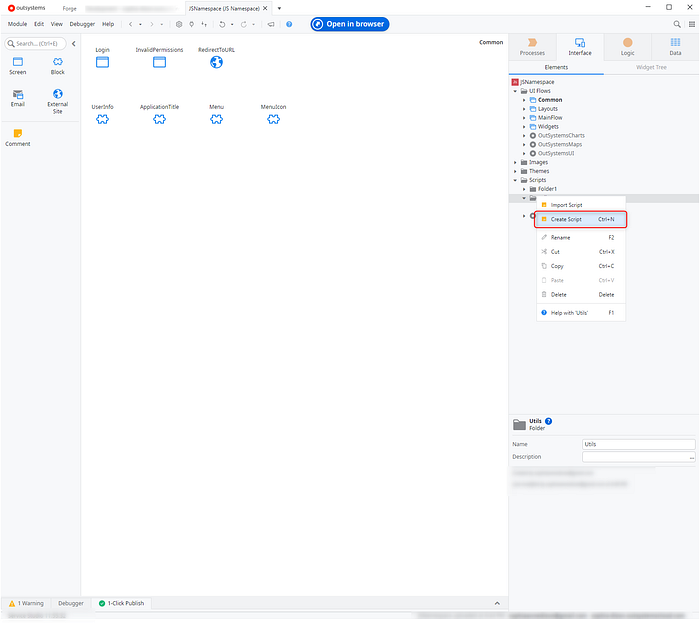
Step 1. Define your utility script.
Create a script inside Scripts folder
Press enter or click to view image in full size
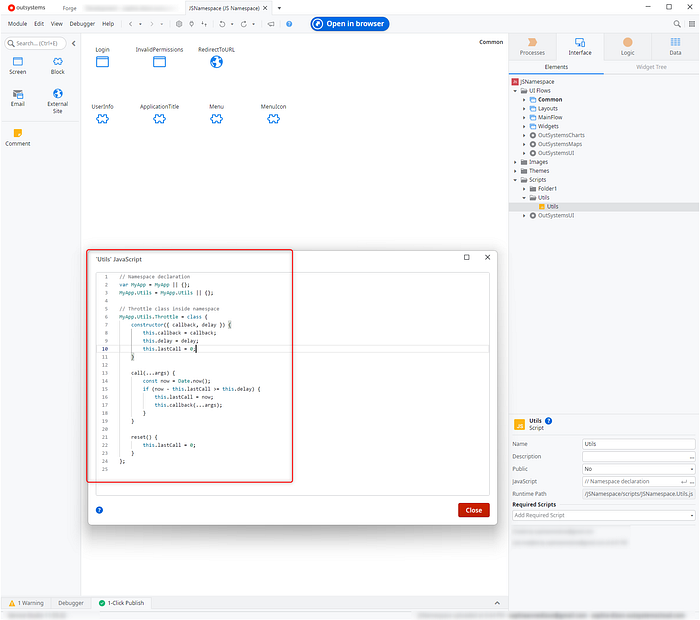
Copy below sample throttle script declaration
// Namespace declaration
var MyApp = MyApp || {};
MyApp.Utils = MyApp.Utils || {};

// Throttle class inside namespace
MyApp.Utils.Throttle = class {
    constructor({ callback, delay }) {
        this.callback = callback;
        this.delay = delay;
        this.lastCall = 0;
    }

    call(...args) {
        const now = Date.now();
        if (now - this.lastCall >= this.delay) {
            this.lastCall = now;
            this.callback(...args);
        }
    }

    reset() {
        this.lastCall = 0;
    }
};
It should look like below:
Press enter or click to view image in full size
What this script does:
(a) The namespace declaration checks if MyApp MyApp.Utilsalready exists, otherwise it creates it.
(2) Then we define a Throttle class with 2 key parameters
callback→ the function you want to throttle.delay→ the cooldown period (in milliseconds) between calls.
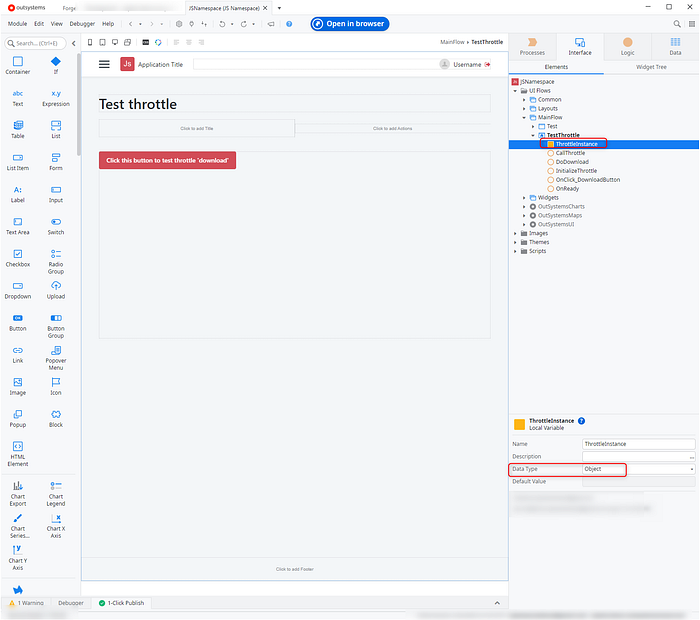
Step 2. Create a local variable that will contain the throttle instance
Create a screen and add a local variable. Then change the local variable data type to Object. This local variable is intended to contain the throttle instance.
Press enter or click to view image in full size
Step 3. Initialize throttle instance
Create InitializeThrottle client action. Then drag JavaScript node, add output parameter with Object data type.
Afterwards add below script:
Press enter or click to view image in full size
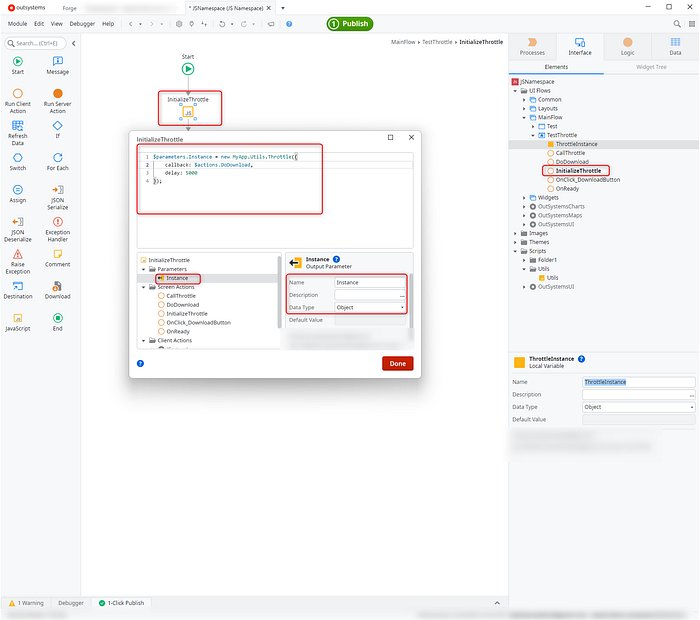
Or copy below:
$parameters.Instance = new MyApp.Utils.Throttle({
    callback: $actions.DoDownload,
    delay: 5000
});
Notice that in the callback parameter we are assigning function named DoDownload. Ensure you also have same client action, the example below is simple console log to simulate download.
Press enter or click to view image in full size
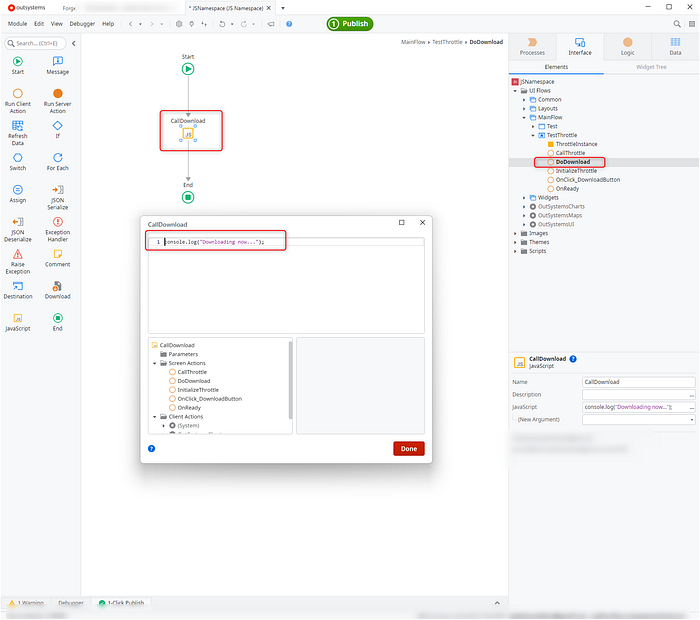
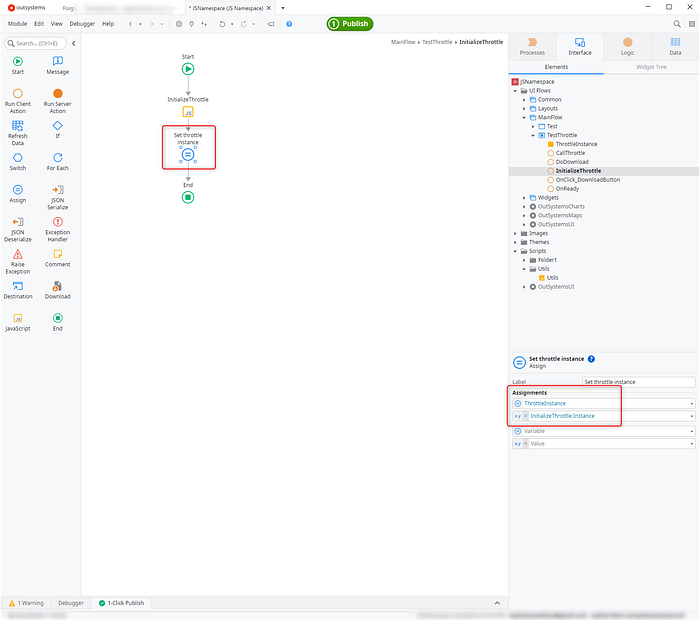
Then assign the output parameter to the ThrottleInstance local variable.
Press enter or click to view image in full size
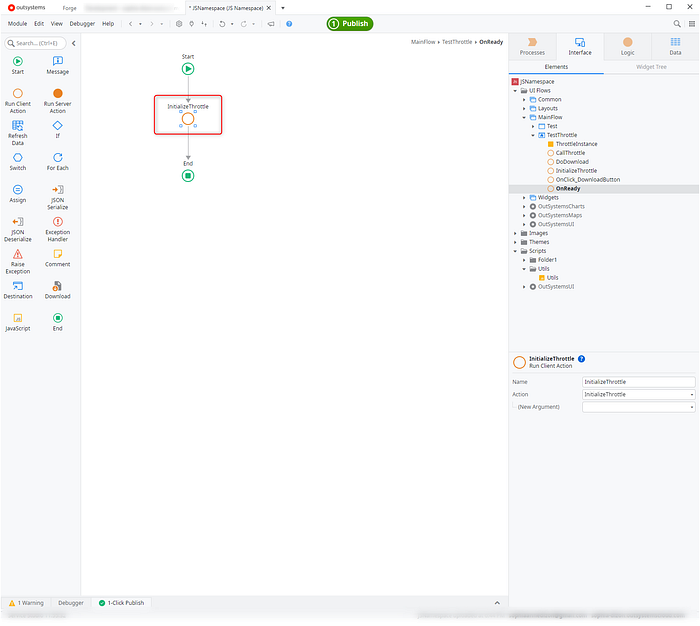
Create an OnReady screen event.
Press enter or click to view image in full size
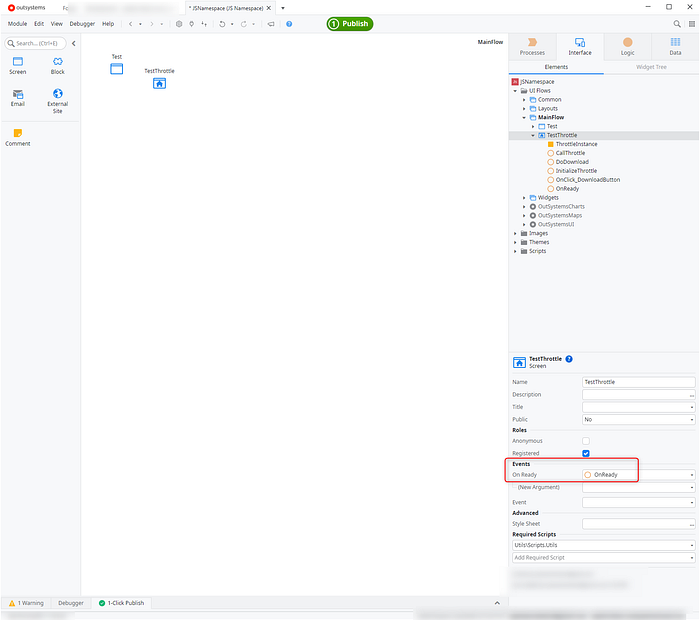
Then drag the InitializeThrottle client action you have created
Press enter or click to view image in full size
You also need to create a client action that calls the throttle instance. In this example create CallThrottle client action. Then drag another JavaScript node. Add the following script:
Press enter or click to view image in full size
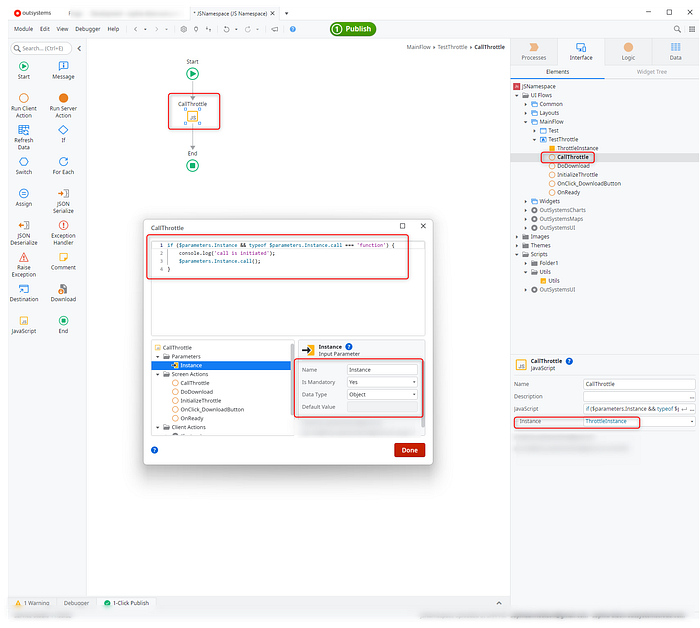
Or copy below:
if ($parameters.Instance && typeof $parameters.Instance.call === 'function') {
    console.log('call is initiated');
    $parameters.Instance.call();
}
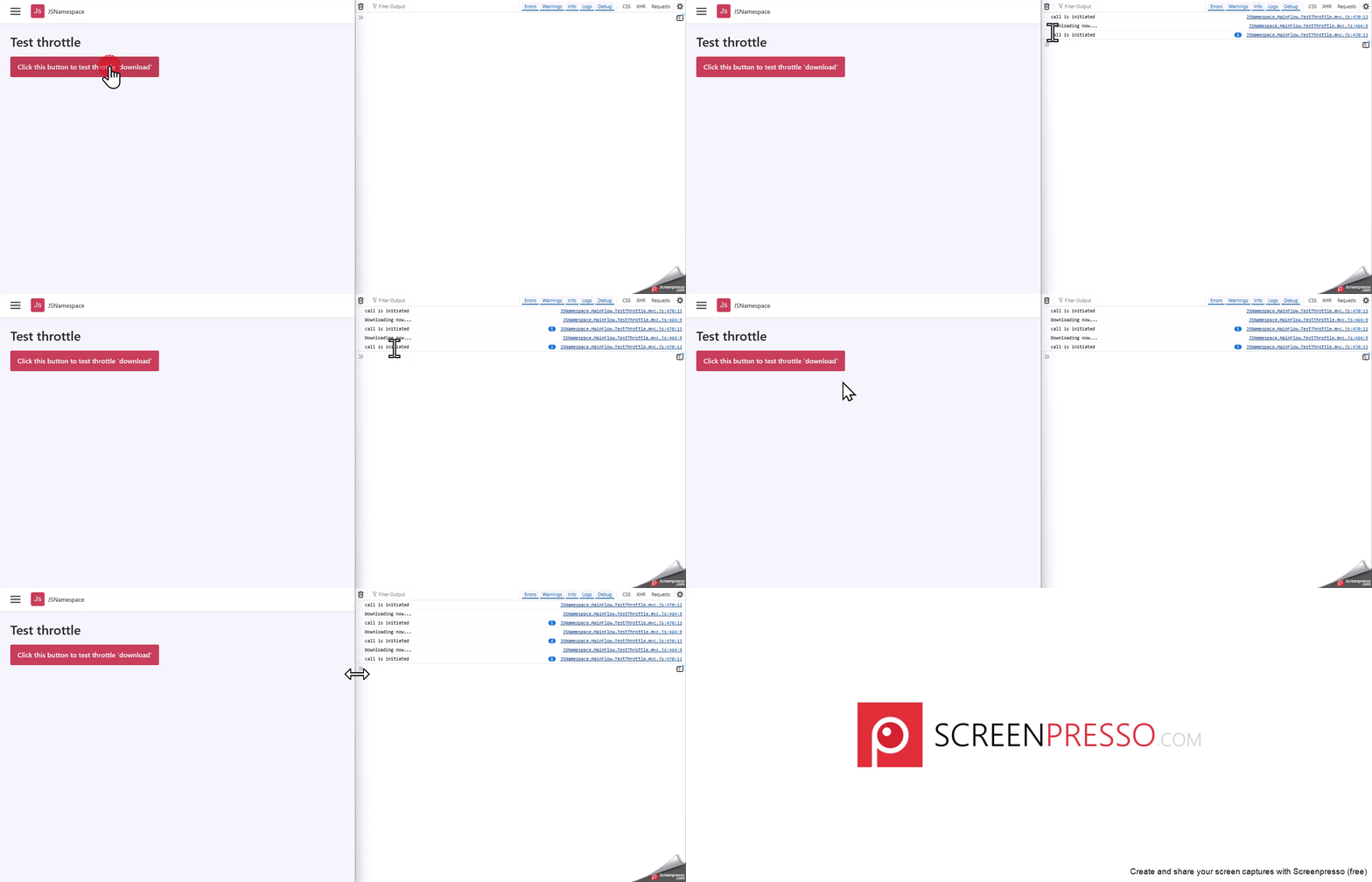
We add simple console log to test that the Throttle instance is called.
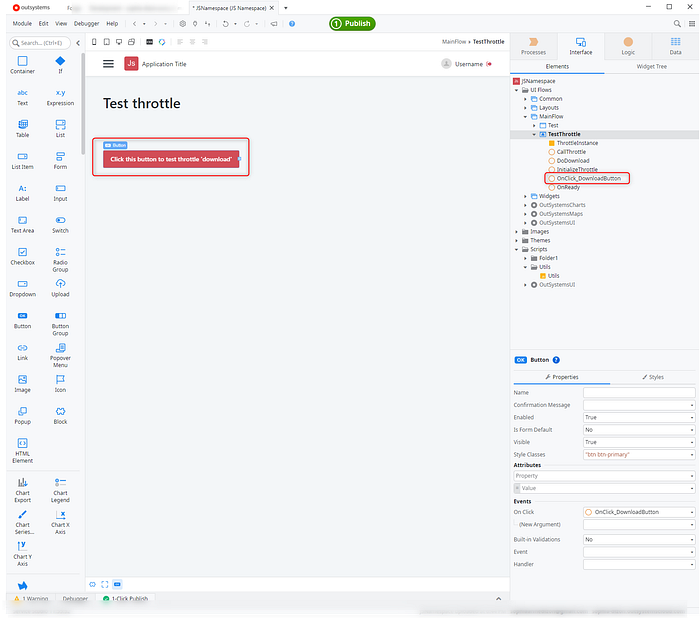
Finally, to test that our throttle functionality works, create a button
Press enter or click to view image in full size
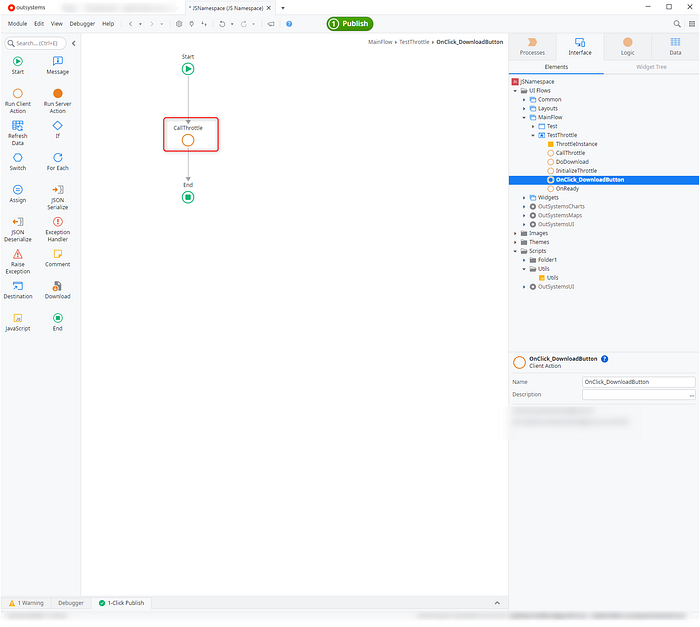
Inside the Button onClick event drag the CallThrottle client action
Press enter or click to view image in full size
Publish and it should work as below
Press enter or click to view image in full size
“First do it, then do it right, then do it better.“
Key takeaways
(1) Namespaces keep your scripts organized and conflict-free.
They group related utilities under one logical structure instead of scattering functions across the global scope.
(2) Avoiding global variables makes your code safer in Reactive apps.
OutSystems pages don’t always reload, so global functions can linger or collide between screens.
(3) Storing Throttle/Debounce instances locally improves memory management.
Local-scoped instances clean up automatically with the screen lifecycle, reducing bugs and “function still running” errors.
In short:
Creating namespaces isn’t just about cleanliness , it’s about making your OutSystems apps more predictable, modular, and maintainable.
Tip: Bundle utilities like Throttle, Debounce, and Formatter inside a single namespace (e.g., MyUtils). Over time, this becomes your own reusable utility library across multiple projects.
Final thoughts
Building clean, maintainable apps in OutSystems isn’t just about visuals or logic, it’s also about how you organize your scripts and utilities behind the scenes. Your future self and your team will thank you for it.
Namespaces give you that structure.
They make your JavaScript easier to reason about, safer across lifecycles, and ready to grow as your app does.
Start simple: create a MyUtils namespace, drop in one helper like Throttle, and use it across a couple of screens. Before long, you’ll realize you’ve built your own micro-library, a toolkit that saves you from copy-paste headaches and lifecycle bugs.
Happy coding!
This article was originally published on Medium.com